Categorieën
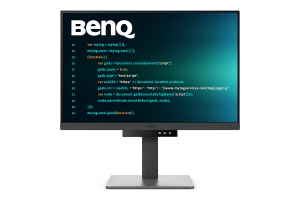
Benq - BenQ RD240Q computer monitor 61,2 cm (24.1") 2560 x 1600 Pixels WQXGA LCD Zwart
| Productinformatie | |
| Categorie | PC monitors |
| Voorraad | 10 |
| Levertijdsindicatie | 2 dagen |
| Artikelnummer | 9H.LLXLA.TBE |
| EAN/UPC | 4718755093272 |
| Documentatie |
| Generated PDF |
| EU Product Fiche |
| EU Product Fiche |
| ProductStory |
| ProductStory2.0 |
| Beschrijving |
|
BenQ RD240Q. Beeldschermdiagonaal: 61,2 cm (24.1"), Resolutie: 2560 x 1600 Pixels, HD type: WQXGA, Display technologie: LCD, Beeldoppervlakte: Antireflectie, Responstijd: 5 ms, Oorspronkelijke beeldverhouding: 16:10, Kijkhoek, horizontaal: 178°, Kijkhoek, verticaal: 178°. Ingebouwde luidsprekers. Ingebouwde USB-hub, Versie USB-hub: 3.2 Gen 1 (3.1 Gen 1). VESA-montage, In hoogte verstelbaar. Kleur van het product: Zwart
Astonishing Clarity for the Ultimate Coding Experience Utterly Clear, Entirely Focused. Crystal-Clear Coding, Glare-Free Brilliance Crafted for Coders: BenQ Programming Monitors offer you full immersion in your code no matter where you are. Superior Code Differentiation BenQ's advanced coding modes ensure crystal-clear fonts and improved code differentiation, reducing eye strain during prolonged use. Code with Comfort and Efficiency Offer both dark and light themes for adaptable coding environments. Swiftly adjust brightness, sharpness, and contrast for optimal coding conditions. Take Control of Display Settings with Display Pilot 2 Display Pilot 2 is designed to meet your needs. Users can arrange preferred functions with ease, including Shortcuts, Desktop Partition, Application Mode, Software Dimming, Circadian Mode, and more. Assign Different Modes to Applications Application Mode makes it easy to assign different color modes and remembers your frequently-used settings for your applications. Bind your IDE with the RD series' advanced coding modes for the optimal state of flow! Intelligent Circadian Displays for Comfortable Eyes BenQ Low Blue Light Plus includes Circadian Mode, which automatically adjusts your screen's color temperature throughout the day, mirroring the natural sunrise to sunset cycle. Enjoy eye comfort worry-free. Boost Efficiency with Display Pilot 2 Shortcuts The Exclusive Shortcuts feature allows you to easily bind commonly used functions to the hotkeys. With Display Pilot 2, copying and pasting shortcuts is no longer limited to one set at a time; it conveniently remembers two sets of content at once, enhancing efficiency. Optimization for Maximum Physical Comfort Enhance your coding workspace with adjustable height, tilt, pivot, and swivel capabilities for optimal efficiency and comfort. Optimal Posture, Superior Output Relieve prolonged neck and body aches. BenQ Programming Monitors prioritize your comfort for long-term projects. Coders' Dream Desk Setup : Comfort and Flexibility at Its Core Create your personalized workspace and fully enjoy it. Endless Horizons, Intuitive Workflows Whether it's multi-screen integration or single-screen data comparison, a BenQ Programming Monitor meets your multitasking needs. Achieve More and Scroll Less With a rare 16:10 ratio design, RD240Q is crafted for coders to provide them with an expansive field of view. Seamless Connectivity with Easy Plug and Play BenQ Programming Monitors offer ample port options, including USB Type-C for all-in-one connectivity. Daisy Chain with the 90W USB Type-C Multi-Stream Transport Technology allows you to extend screens across multiple displays using USB Type-C. The 90W USB Type-C carries images, videos, and other data seamlessly, plus it charges your mobile devices at the same time, all with one cable. Please note that Mac® and MacBook® devices only support daisy chaining via Thunderbolt. Daisy chaining is not supported via HDMI or using regular USB ports on any device. Also, you can only connect a single external display using a Mac device with the M1 or M2 chips. For more information about connecting different models of Mac devices to external displays, please refer to the Apple website. Coding Hotkey and Function Bar Effortlessly boost productivity with our unique Coding HotKey and Function Bar designs. With a swift press of the Coding HotKey at the heart of the function bar, immerse yourself instantly into the coding realm. Keep Your Eyes Fatigue-Free Experience unmatched eye comfort during night hours with our Night Hours Protection and advanced Brightness Intelligence Gen2. BenQ Eye-Care Technology is dedicated to enhancing your visual comfort. Night Hours Protection Discover enhanced eye protection in dark with our Night Hours Protection. Its intelligent ambient light detection and auto-switch capabilities require minimal user intervention, ensuring effortless and consistent eye care. Brightness Intelligence Gen2 BenQ B.I. Gen2 detects the brightness in the environment and automatically adjusts the screen brightness, giving you more customization and care for your eyes. Code with Refreshed Eyes For over a decade, BenQ leading Eye-Care Technology has safeguarded your eye health and provided comfort during long hours of screen time. Global safety authority TÜV Rheinland certifies RD240Q's Flicker-Free and Low Blue Light as truly friendly to the human eye. Eyesafe 2.0 certification ensures that the display reduces blue light while maintaining vivid color. BenQ’s Green Commitment : A Vision of Sustainability BenQ prioritizes eco-friendly practices in our product development, underlining our commitment to sustainability. BenQ Programming Monitors incorporate eco-friendly technology, recycled materials, and an energy-efficient design. 85% PCR The housing of monitors is made with 85% PCR (Post-Consumer Recycled) materials, contributing to environmentally conscious production practices. Recyclable Cardboard Packing We package our monitors in recyclable cardboard, minimizing our environmental impact and promoting eco-friendliness. Auto Power Off The Auto Power Off of our feature allows users to automatically power down the screen after 10, 20, or 30 minutes of inactivity, conserving energy and further promoting sustainability. EcoPrivacy Save power and safeguard screen privacy effortlessly with our feature that automatically dims your monitor during inactivity. |
Soak in an unforgettable world of colors and detail with over 5 million pixels and 178º wide-viewing angles.

No need to buy external speakers for great audio. With integrated speakers this display is ready to go once you’re connected.

No need to buy external speakers for great audio. With integrated speakers this display is ready to go once you’re connected.
The display is equipped with standard VESA mounting for showcasing on a wall or swivel arm.

No matter where you stand, this screen delivers clear, vivid images with 178º wide-viewing angles, so everyone can get a great view.

No matter where you stand, this screen delivers clear, vivid images with 178º wide-viewing angles, so everyone can get a great view.
Using the Low Blue Light mode subtly shifts your display’s colors to a warmer spectrum, while making whites more natural and putting less strain on your eyes.

Using the Low Blue Light mode subtly shifts your display’s colors to a warmer spectrum, while making whites more natural and putting less strain on your eyes.
Videos and games come to life with less stutter or blur for more realistic play with smooth 5 milisecond gray-to-gray response time.

Videos and games come to life with less stutter or blur for more realistic play with smooth 5 milisecond gray-to-gray response time.
Vibrant detail from practically any position with consistent color and image clarity maintained across an ultra-wide 178° horizontal and vertical viewing angles.

Vibrant detail from practically any position with consistent color and image clarity maintained across an ultra-wide 178° horizontal and vertical viewing angles.
With Display Port, HDMI MHL, and HDMI 2.0 you’ll get all the ports you need to easily connect your device for big screen entertainment.*
*High definition (HD) content is required to view high-definition images.
*High definition (HD) content is required to view high-definition images.
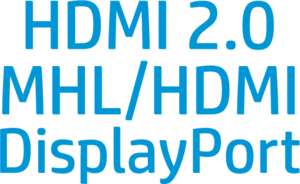
With Display Port, HDMI MHL, and HDMI 2.0 you’ll get all the ports you need to easily connect your device for big screen entertainment.*
*High definition (HD) content is required to view high-definition images.
*High definition (HD) content is required to view high-definition images.
Gas piston design allows 130mm of smooth, precise height adjustment so your display is always in the most comfortable position, no matter who is viewing it.